Let’s take a simple example to understand the problem.
A family moves into a housing society/community, but the main gate doesn’t recognise them because their access details haven’t been updated. Meanwhile, a tenant who moved out months ago can still access the clubhouse gym because their permissions were never removed.
Both devices are working fine. The problem? The access control systems operate separately and aren’t connected to the society’s records.
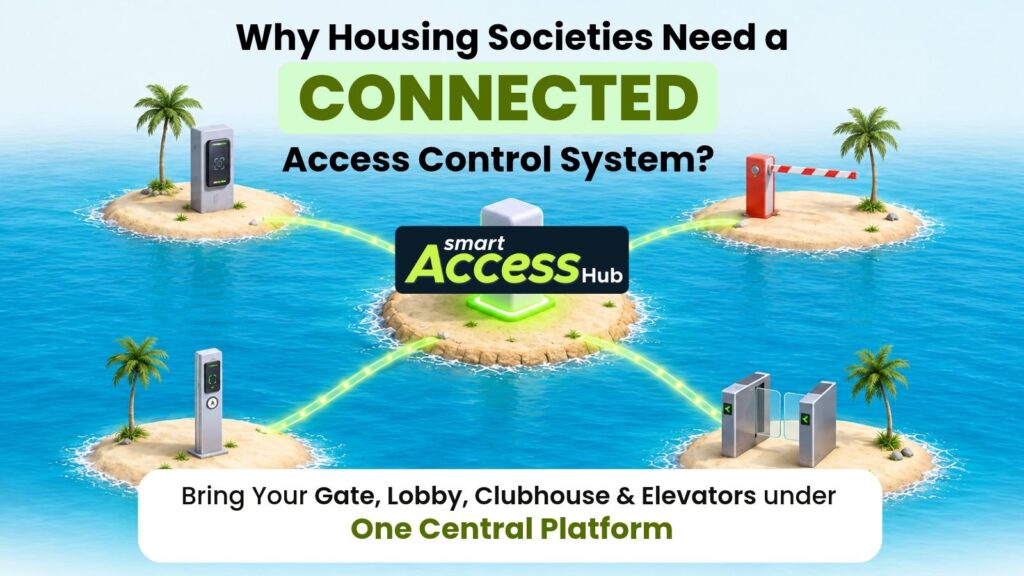
This is why housing societies need a connected access control system.
A housing society needs connected access control because access permissions depend on information that changes every day, including resident details, move-ins, move-outs, visitor approvals and maintenance dues.
When all access points use the same live records, an update made in one place can apply across every authorised door. The society can enforce access rules consistently, maintain a central record of entry activity and reduce the need for manual updates.
With disconnected systems, each device operates independently. This creates gaps in security, increases administrative work and makes it difficult to enforce community rules.
What Does Disconnected Access Control Look Like in a Housing Society?
Most housing societies already have access control hardware. The problem is often not the hardware itself, but the lack of integration between devices and the society’s management system.
Consider what happens when a new tenant moves in. The society updates its records, but the main gate, clubhouse reader and lift access system may still have the old information. Someone must update each device separately.
The same problem occurs when a tenant moves out, a domestic helper is let go, or the committee wants to restrict access to a facility.
Here are some common examples.
- A new tenant moves in: The gate’s access list is not updated, so the resident gets stuck at the entrance.
- A tenant moves out: Their credentials remain active, allowing them to continue using facilities such as the gym or swimming pool.
- A domestic helper is let go: Their access card may continue working at doors where their permissions were never removed.
- A resident crosses the society’s dues threshold: The committee cannot automatically restrict their clubhouse access because dues and access permissions are managed separately.
- A visitor is approved at the gate: The lobby or lift system may not know about the approval, creating delays or requiring a guard to escort the visitor.
- An incident occurs: Entry records are spread across different devices, making it difficult for the committee to reconstruct what happened.
Four Problems With Separate Access Control Systems
1. Missed updates
Every manual update creates another opportunity for an error. When several devices maintain separate access lists, keeping them all up to date becomes difficult.
2. Rules that cannot be enforced automatically
Rules around amenity timings, resident-only areas, service lifts and defaulter restrictions depend on information from the society’s records. A standalone device cannot apply rules based on information it cannot access.
3. Multiple vendors with no single point of accountability
When the gate, clubhouse and lifts use different systems, troubleshooting can become complicated. Vendors may point to one another, leaving the committee to coordinate between multiple support teams.
4. Slow deployment and adoption
Some biometric systems require residents to register separately at individual devices. This can make implementation time-consuming. Cards can also be lost or misused, creating additional administrative work.
Residential communities have specific requirements, including tenant management, domestic staff permissions, visitor approvals, amenity bookings and maintenance dues. A collection of disconnected devices may control individual doors, but it cannot consistently manage all these requirements together.
What Is a Connected Ecosystem of Access Control?
A connected ecosystem links the community’s access points to one central platform, which is also connected to the society’s management records.
Instead of each device maintaining a separate list of authorised people, the devices rely on shared information. This allows the system to apply the same access permissions and community rules across all connected doors.
A connected access control system has four key features.
One central registry
Residents, staff and visitors can be registered through a common system, with their access permissions applied across the relevant devices.
Centralised rule enforcement
Rules for amenity access, tenant permissions and defaulter restrictions can be configured centrally and applied at the relevant doors.
One accountable support team
The main gate, lobby, clubhouse, basement and lift access systems can be managed as part of one connected solution, reducing the need to coordinate with multiple vendors.
Simpler access management
Depending on the setup, access can be provided through app-based digital passes, cards or face recognition. Permissions can then be managed centrally instead of updating every device separately.
How SmartAccessHub Connects the Different Layers
SmartAccessHub brings together three key layers to connect access points with the society’s records.
1. Access devices at entry points
These are the devices installed at common access points, such as the main gate, boom barrier, lobby, lift, basement and clubhouse. Depending on the installation, they can support face recognition, app-based QR codes, staff ID cards and visitor passes.
2. Central intelligence engine
The central engine processes access requests. It verifies the person’s identity, checks their permissions for the specific door, applies the configured community rules and sends the appropriate open or deny signal.
3. The society’s master data
The system connects with the community management platform to access relevant records, including resident details, staff profiles, visitor approvals, community rules and defaulter information. These records can be synchronised through available integrations and APIs.
The third layer is particularly important. When access control is connected to the records the society already maintains, access decisions can reflect changes in the community instead of depending on someone remembering to update every device.
What Happens When Someone Approaches a Door?
Every access attempt follows the same basic process.
- The person presents their identity or access credential.
- The system verifies the identity.
- It checks whether the person has permission to enter that specific area.
- It applies the relevant community rules.
- The door opens if access is authorised. Otherwise, entry is denied and the event is logged.
SmartAccessHub is designed to process these checks in under a second.
The result is a more consistent access experience across the community.
Why Your Society Needs Connected Access Control: Key Benefits
Connecting access points to one platform does more than simplify administration. It helps societies manage permissions, enforce rules and maintain clearer records.
1. Update access permissions once
When a resident, tenant or staff member is added, updated or removed, the change can be applied across their authorised access points through the connected system.
The committee no longer needs to coordinate separate updates at every device.
2. Remove access across the community when someone moves out
When a tenant moves out, their permissions can be deactivated centrally. Access can then be removed across the connected gate, lobby, lift, basement and clubhouse systems at the same time.
This helps prevent former residents from retaining access because one device was overlooked.
3. Enforce community rules automatically
A connected system can apply configured rules for maintenance dues, amenity timings, resident-only zones and facility bookings.
Instead of relying on a guard to remember every rule, the system checks the relevant permissions when someone attempts to enter.
4. Improve access security
Only authorised people can enter the areas covered by the configured access rules. Centralised permissions also make it easier to manage changes when residents move in or out, or when staff access needs to be updated.
5. Reduce dependency on guards at routine entry points
Automating routine access can reduce the need for guards to be stationed at every door.
SmartAccessHub communities see up to 70% less guard dependency at clubhouse, lobby and amenity doors. Each guard replaced at an access point can save approximately ₹2.4–3 lakh annually, according to the figures provided for this solution.
The aim is not to eliminate security personnel. With routine entry managed by the system, guards can focus on incidents, emergencies and situations that require human judgement.
6. Maintain one complete access log
A connected platform can bring entry records from different access points into one place.
The committee can review who entered, which door they used, when the entry occurred and which access method was used. This makes it easier to review incidents without piecing together separate device logs and guard recollections.
7. Simplify vendor management
When connected access points are managed through one solution, the committee has a single point of contact for support instead of coordinating with multiple vendors for different doors.
8. Make better facility management decisions
Access data can help the committee understand how residents use common facilities, including which amenities are used most frequently and at what times.
These insights can support decisions about maintenance, facility planning and future investments.
What Can a Connected Access Control System Enforce?
The biggest advantage of a connected access control system is that it can use information from the society’s records to make access decisions.
Standalone devices may verify a card or biometric credential. A connected system can also check whether the person is authorised to enter that particular facility under the community’s current rules.
The Clubhouse Door That Knows Your Dues Status
Consider a housing society that wants to restrict clubhouse access for residents whose outstanding dues exceed a threshold set by the committee.
With disconnected systems, the dues information and access permissions sit in different places. The clubhouse reader cannot act on the dues status unless someone manually updates its access list.
With a connected system, the process can work as follows:
- The society’s management system flags a resident whose outstanding dues cross the configured threshold.
- The access platform receives the updated information.
- Clubhouse access is restricted at the configured access points.
- Once the dues are cleared and the relevant records are updated, access can be restored.
This reduces manual coordination and avoids putting the security guard in the position of having to enforce the rule through a confrontation.
The exact restrictions depend on the rules configured by the committee and the access points connected to the system.
One Update, Every Door
Connected access control also simplifies everyday changes within a housing society.
- A new resident moves in: Their authorised face or app-based access can be activated across the relevant doors.
- A tenant moves out: Their permissions can be removed across connected access points together.
- A domestic helper is let go: Their access card can be deactivated centrally, removing access at the connected doors.
- A visitor is approved: They can receive a pass limited to the relevant doors and duration, with access expiring automatically.
- A resident crosses the configured dues threshold: Their access to selected clubhouse facilities can be restricted without manually updating each device.
The difference is straightforward. With disconnected systems, each change requires someone to coordinate updates. With a connected ecosystem, permissions can follow the society’s records automatically.
How Can Your Housing Society Move to a Connected Access Control System?
Before investing in new devices, the committee should understand how its current access control setup works and where the gaps are.
Signs Your Society Has Disconnected Access Control
Your society may be operating with disconnected systems if:
- New tenants sometimes get stuck at the gate because their access was not updated.
- Former residents or staff retain access after moving out or leaving.
- Updating permissions requires visiting multiple devices or contacting different vendors.
- The committee cannot automatically enforce configured restrictions on amenities.
- Entry records are spread across separate systems or are difficult to retrieve.
- No single vendor takes responsibility for the entire access control setup.
If several of these situations sound familiar, it may be time to review how the society manages access.
Five Steps to Build a Connected Ecosystem
Step 1: List every access point
Identify all the areas where access is controlled, including the main gate, boom barrier, tower lobby, lifts, basement and clubhouse.
For each location, note which device is installed, which vendor manages it, where its access list comes from and who is responsible for updating it.
Step 2: Choose a platform that connects with your society’s records
Look for a central access control platform that can integrate with the community management system already used by your society.
This helps resident details, staff profiles, visitor approvals and relevant community rules flow into the access system without maintaining multiple independent records.
Step 3: Start with the access point causing the most problems
For some communities, the clubhouse is the priority because of amenity restrictions and unauthorised access. For others, the main gate is the biggest concern because of queues, manual verification and guard dependency.
Start with the area where the improvement will be most noticeable, then expand the setup.
Step 4: Connect the remaining access points
Extend the system to the lobby, lifts, basement and other common areas. The objective is for every connected device to follow the same registry and rules rather than maintain its own separate list.
Step 5: Configure the community’s rules
Set up the applicable rules for amenity timings, resident-only areas, booking permissions and defaulter restrictions. Once configured, these rules can be applied automatically at the relevant access points.
Questions to Ask Before Choosing a Vendor
Before selecting a connected access control system, the committee should ask:
Can one platform manage the gate, lobby, lift, basement and clubhouse?
Look for a solution that can bring the relevant access points under one connected platform and provide a clear point of contact for support.
Can it integrate with our society management system?
Ask whether resident, staff, visitor and dues-related information can be synchronised through available integrations, reducing the need for manual updates.
What happens when a tenant moves out?
The system should allow access to be deactivated centrally and removed from all relevant connected doors without separate manual updates.
Can it enforce amenity rules and dues-based restrictions?
Check whether the committee can configure the relevant permissions and have them applied automatically at the selected facilities.
How are visitors and delivery agents managed?
Ask whether passes can be restricted to specific access points and time periods, and whether they expire automatically.
How is resident consent managed if face recognition is used?
Understand how residents provide and withdraw consent, how biometric data is stored and deleted, and how the system addresses the applicable data protection requirements, including India’s Digital Personal Data Protection Act, 2023.
Can the committee access a unified entry log?
Confirm whether entry records from connected access points can be reviewed through one platform.
The goal is not simply to buy more devices. It is to make the devices your society already has, and any new ones it installs, work together as one system.
See SmartAccessHub Live at Your Community
SmartAccessHub connects common access points across a housing society, from the main gate and boom barrier to the lobby, lifts, basement and clubhouse.
By connecting access devices with the community’s records, SmartAccessHub helps societies manage permissions centrally, apply configured rules and reduce the manual effort involved in everyday access management.
Request a demo to see how SmartAccessHub can work in your community.
Frequently Asked Questions
1. What is a connected access control system?
A connected access control system links a community’s access points to one central platform that is integrated with relevant society records, such as resident, staff, visitor and dues information. This allows permissions and configured rules to be applied consistently across connected doors.
2. Why do housing societies need connected access control?
Housing societies need connected access control because resident details, move-ins, move-outs, visitor approvals and dues change regularly. When each device maintains its own list, updates can be missed. A connected system helps keep access permissions aligned with the society’s records.
3. What are the problems with separate access control systems?
Separate systems require manual updates at multiple devices, make it difficult to enforce rules automatically, and often involve multiple vendors and disconnected entry logs. They can also make deployment more complicated when residents need to register separately at different devices.
4. Can connected access control restrict defaulters from the clubhouse?
Yes, if the system is integrated with the society’s records and the committee has configured the relevant rule. When a resident crosses the specified dues threshold, access to selected clubhouse facilities can be restricted. Access can be restored once the dues are cleared and the records are updated.
5. What happens to access when a tenant moves out?
In a connected system, the tenant’s permissions can be deactivated centrally and removed from the relevant connected doors, including the gate, lobby, lift, basement and clubhouse. This reduces the risk of access remaining active on a device that was not manually updated.
6. How are visitors and delivery agents managed?
Visitors can be issued passes limited to specific access points and a defined duration. Delivery agents can also be restricted to the relevant tower or lobby, depending on the system configuration. The pass can expire automatically when the permitted period ends.
7. Does a connected access control system require replacing all existing hardware?
Not necessarily. The society should first assess its existing devices and determine which can be integrated with a central platform and which may need replacement. The decision can be made access point by access point.
8. Does connected access control reduce the number of security guards required?
It can reduce dependency on guards for routine entry at selected access points. SmartAccessHub communities see up to 70% less guard dependency at clubhouse, lobby and amenity doors. The objective is to automate routine access so security personnel can focus on incidents, emergencies and situations that require human judgement.
9. Is a connected access control system safe for resident data?
Data protection depends on how the system is designed and managed. SmartAccessHub earns revenue through subscriptions rather than advertising or selling data, and community data belongs to the community. Its face recognition system stores a face as a double-encrypted string rather than an image, with resident consent controls and deletion options. The solution is designed to address applicable requirements, including India’s Digital Personal Data Protection Act, 2023 and the IT (SPDI) Rules, 2011.
Explore More
- How SmartAccessHub works: devices, engine and ERP synchronisation
- Smart access algorithms: rules that enforce themselves
- Security gates and flap barriers
- Lobby and tower entry
- Elevator access control
- Basement and parking access
- Clubhouse and amenity access
- Privacy and data protection